Publishing & delivering lessons
When your lesson is ready for learners, you can publish it directly from the lesson editor. Each published version is a snapshot of your lesson at that point in time, so you can keep editing without affecting what learners see.
Publish a version
- Open your lesson in the editor.
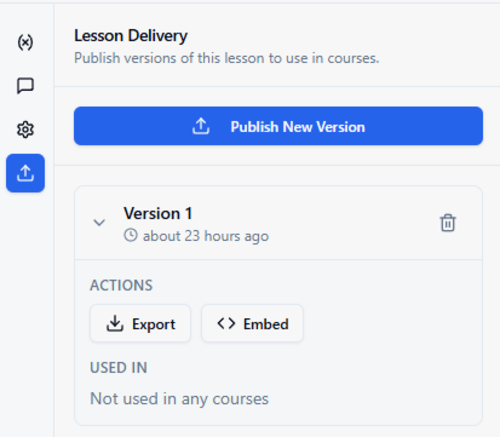
- In the left toolbar, click the Lesson Delivery icon (the upload arrow at the bottom).
- Click Publish New Version.
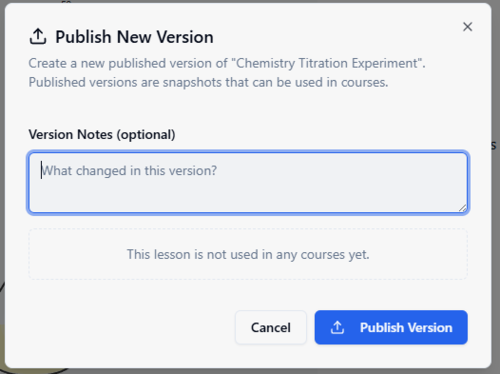
- Optionally add version notes describing what changed, then click Publish Version.
Each version is timestamped so you can track when it was published. You can publish as many versions as you need — learners always get the latest.
Deliver your lesson
Once a version is published, you have two options for getting it to learners:
Embed (hosted by Teacharium)
Click Embed on any published version to get everything you need to add the lesson to your website or LMS. The dialog provides your lesson and version IDs, server-side token generation code, and client-side embed code using the @teacharium/embed-sdk.
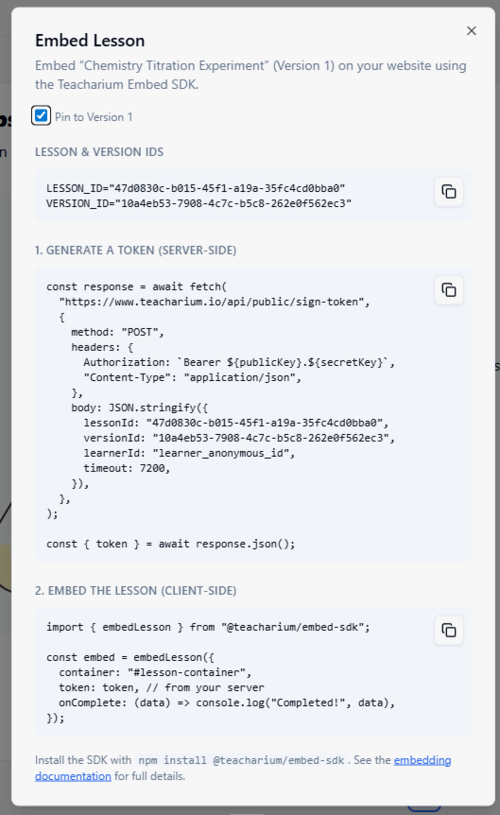
For full details on embedding, see the embedding documentation.
Export (self-hosted)
Click Export to download the published lesson data. Use this with the Player SDK to host and render lessons in your own application, giving you full control over the experience.