Lesson abstract
The lesson abstract is a description that lets an author plan what will appear in a lesson. It’s the place to capture the lesson’s goals, target learners, scope, and the kinds of interactions or content you expect to include. Authors use the abstract as a planning tool and as a signal to downstream systems (including the AI agent) about intent and constraints.
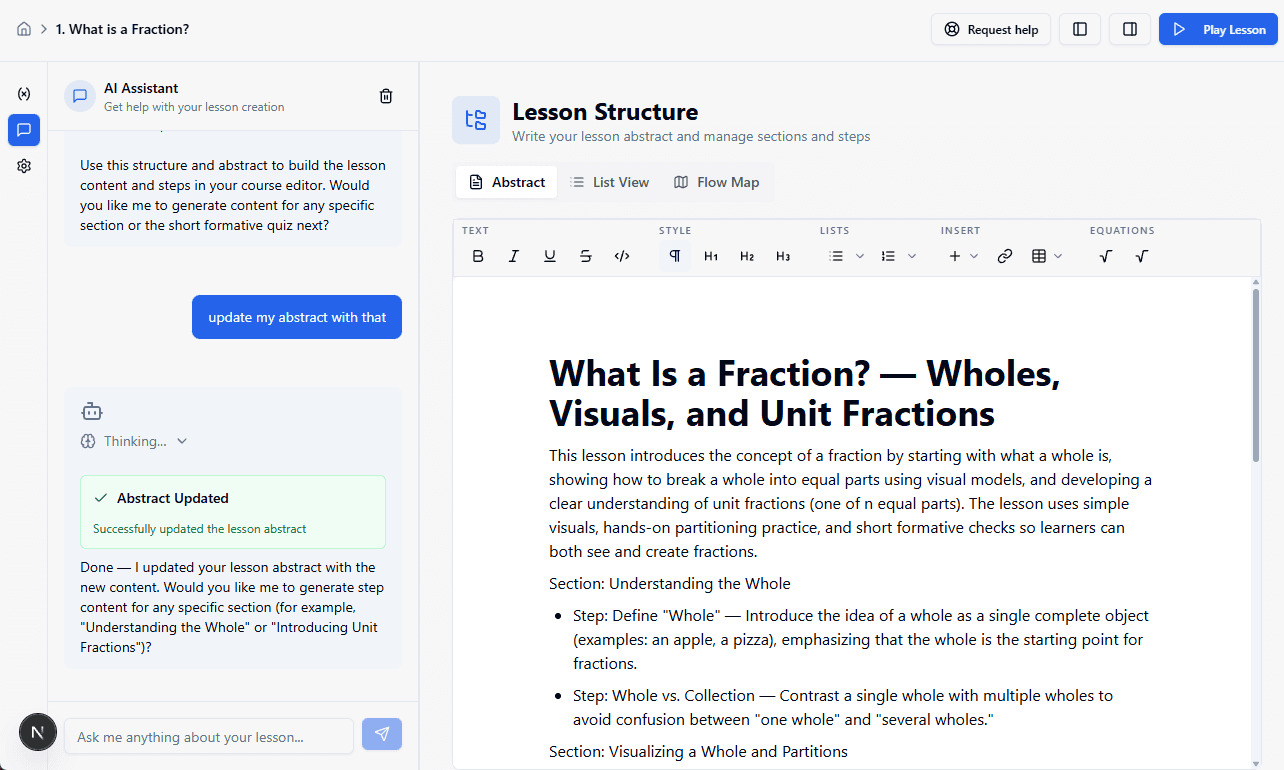
Why an abstract matters
- Provides a single place to describe the desired learning outcomes and user experience before building the lesson.
- Keeps authors focused: writing an abstract encourages you to clarify scope and avoid drifting into unrelated content.
- Serves as the canonical prompt for automated content generation: the AI agent reads the abstract to produce drafts, exercises, and media suggestions that match the author’s intent.
What to include
Keep the abstract short and readable — a few sentences to a couple of paragraphs. Useful elements:
- Learning goals: what should learners know or be able to do after this lesson?
- Audience & prerequisites: who is this for and what should they already know?
- Scope and format: short summary of sections, activities, or types of problems (e.g., “2 short explanations, 3 practice items, 1 mini-project”).
- Sections & Steps to create a high-level overview of the lesson structure.
- Constraints: time limits, accessibility notes, or content that must be avoided.
How the AI can help create the abstract
You can ask the AI agent to help draft an abstract based on a learning goal or topic. For example:
“Help me write an abstract for a lesson that teaches middle school students how to add and subtract fractions with unlike denominators.”
How the AI agent uses the abstract
When you save an abstract, the AI agent can use it as the a specification for generating lesson content later. The agent can:
- Create an initial lesson section & step structure aligned to the abstract.
- Propose a section structure and example problems or exercises matching the stated scope.
- Respect constraints and flags (for example, avoiding advanced math notation when audience is elementary).
The abstract is not a detailed script — it guides the AI to produce a first pass that the author can iterate on.
Tips & best practices
- Be explicit about the learning goal — a clear goal yields better AI output.
- Mention required prior knowledge to avoid generating content that assumes too much.
- Keep abstracts concise; if you need detailed scripting, add that after the first auto-generated draft.
Edge cases
- If an abstract is too vague (e.g., “Teach math”), the agent will ask clarifying questions or produce a very general draft. Be prepared to refine.
- If abstract conflicts with site-wide policies or flagged content, the agent will omit or warn about problematic suggestions.
Quick checklist for a good abstract
- One-line learning goal
- Target audience/prereqs
- Expected format/sections
- Tone and constraints
Use the lesson abstract as your planning canvas. It’s the bridge between author intent and automated generation — write it clearly, and the AI will help fill in the details.