AI Usage Tracking
Many features in Teacharium use AI to generate content, assist with lesson creation, create media assets, and more.
Each organization gets a monthly allocation of AI usage based on their plan.
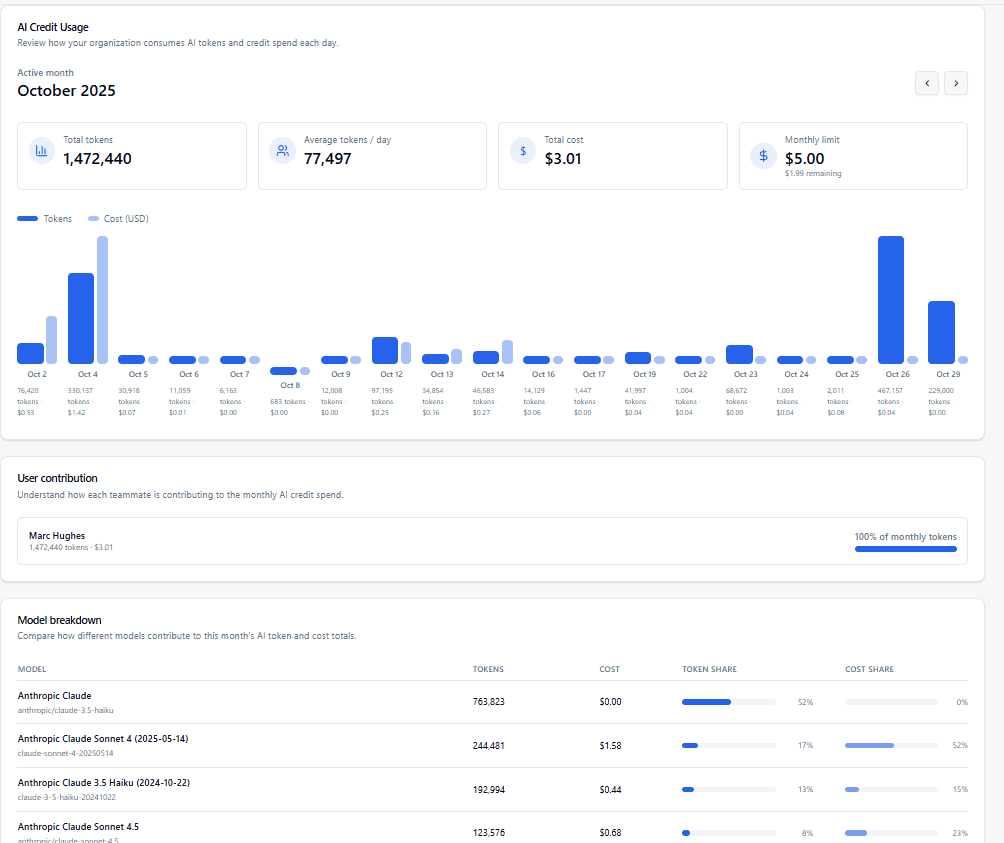
Teacharium tracks AI usage for your organization so you can monitor your usage over time and purchase additional capacity as needed.
Credit Limits
Your organization has a monthly credit limit that controls AI spending. When you reach this limit, AI features will be temporarily unavailable until the next calendar month.
- The Monthly limit card on the Organization Usage page shows your current limit and remaining balance
- Usage is calculated across all organization members
- When the limit is exceeded, you’ll see a red warning indicator
- Limits reset automatically at the beginning of each calendar month
Contact support if you need to adjust your organization’s credit limit.
Monthly breakdown
- Usage is organized by month. When you select a different month, the daily, user, and model summaries update automatically.
- Daily usage charts show how many tokens were used and the cost per day, making it easy to spot unusual activity.
- The view shows your most recent month by default. If no data is available, you’ll see an empty state.
Organization usage UI
Below is an example of the Organization Usage page showing the monthly breakdown and alerts when limits are reached.
Last updated on